Setup & migration
Bought a new device? I set up your computer, phone or tablet completely and transfer your data from the old device – photos, contacts, email, everything.
IT support for private individuals
Laptop won't start, Wi-Fi acting up, or a new phone that needs setting up? I solve your problem – at your home in the canton of Aargau and the Zurich region, or conveniently via remote support anywhere in Switzerland. No jargon, at fair prices.
Windows · macOS · Android · iPhone & iPad · Printers & Wi-Fi
What do you need help with?
Bought a new device? I set up your computer, phone or tablet completely and transfer your data from the old device – photos, contacts, email, everything.
Slow PC, crashes, error messages, printer not printing: I find the cause and fix it – and explain in plain language what was wrong.
Poor signal, no internet, new router from your provider? I make sure you have stable, fast Wi-Fi throughout your flat or house.
Opened a suspicious email, virus warning, hacked account? I clean up your device, secure your accounts and show you what to look out for.
Your photos and documents are irreplaceable. I set up an automatic backup for you – so nothing is lost if a device breaks or goes missing.
Want to do things yourself – video calls, e-banking, managing photos? I show you step by step, at your pace. Ideal for beginners and seniors, too.
Briefly describe your issue using the contact form – I will get back to you by email.
I reply within 24 hours, ask any follow-up questions and tell you honestly what the solution will roughly cost.
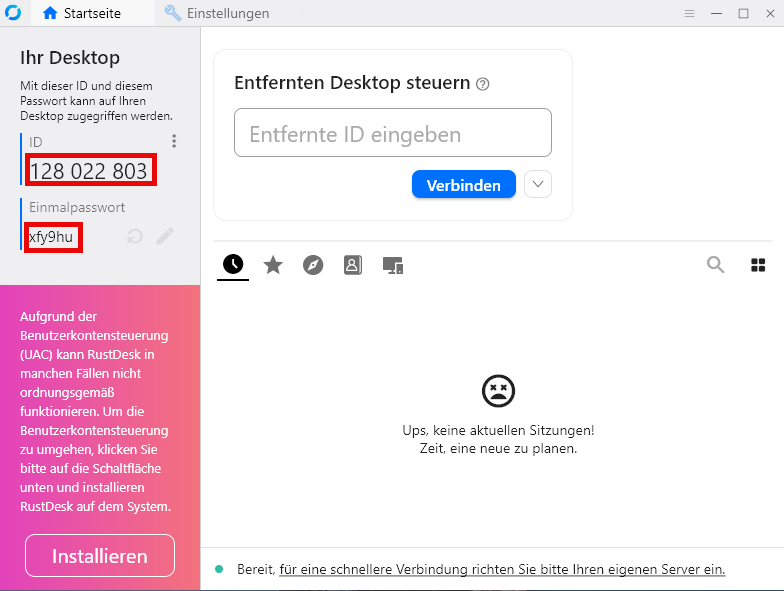
At your home, via remote support – or simply drop your device off with me by arrangement. During remote sessions you watch everything and stay in control at all times; just download my remote support program (RustDesk) – this works on Windows; for Mac, please get in touch with me first. Appointments for on-site visits or device drop-off are possible Monday to Sunday from 7 pm.
Describe your problem – the assessment is free and without obligation. You will know in advance whether and how I can help, and what effort to expect.
As a guide: a typical job costs between CHF 90 and 120. Depending on the effort involved it can be less or more – I always tell you the price before I start.
My promise: If I cannot solve your problem, you pay nothing.
My name is Michel Schneeberger and I live in the canton of Aargau. In my day job I work as an IT system engineer, looking after the technology of an international company – from laptops to the data centre. On the side, I help private individuals who simply want their devices to work. I cover on-site visits throughout the canton of Aargau and the Zurich region – other areas are happily possible by arrangement. Via remote support, I help anywhere in Switzerland.
What sets me apart: I take my time, explain without jargon and never sell you anything you don't need. Remote support runs on the trusted open-source software RustDesk – you can see everything happening on your screen at all times and can end the connection with a single click.
The initial assessment is free and without obligation. You will know in advance what effort to expect – there are no hidden costs. As a guide: a typical job costs between CHF 90 and 120. Depending on the effort involved it can be less or more – I always tell you the price before I start. And: if I cannot solve your problem, you pay nothing.
I answer enquiries submitted through the contact form within 24 hours by email. Appointments for on-site visits or device drop-off are possible Monday to Sunday from 7 pm; remote support by arrangement.
You download my remote support program (RustDesk) and start it with a double click – no installation is required, and you can ignore the “Install” button. You then tell me the displayed ID and one-time password. You can see everything happening on your screen at all times and can end the connection with a single click. After the session I have no further access. Please note: the download only works on Windows. If you use a Mac, just get in touch – we’ll find the right approach together.
Windows PCs and laptops, Mac, Android smartphones and tablets, iPhone and iPad – plus everything around them: printers, Wi-Fi routers, email accounts, smart TVs and more.
Whatever suits you: by Twint, cash, bank transfer – or conveniently by invoice on request.
Just describe the problem briefly – ideally with a photo of the error message, which you can attach directly in the contact form. If a password is needed for the repair (e.g. for email or your Apple or Google account), you type it in yourself. I will never ask you for your passwords.
Briefly describe your issue – I will get back to you within 24 hours. The initial assessment is free and without obligation.